
Some design patterns require you to add properties, methods or interfaces to your target code. If many components in your codebase need to represent the same construct, repetitively adding those constructs violates the DRY (Don't Repeat Yourself) principle. So how can you add code constructs to your target code without it becoming repetitive?
PostSharp offers a number of ways for you to add different code constructs to your codebase in a controlled and consistent manner. The following sections describe these techniques.
Introducing interfaces
One of the common situations that you will encounter is the need to implement a specific interface on a large number of classes. This may be INotifyPropertyChanged, IDisposable, IEquatable<T> or some custom interface that you have created. If the implementation of the interface is consistent across all of the targets then there is no reason not to centralize its implementation. So how do you add that interface to a class at compile time?
Add the
IIdentifiableinterface to the target code.public interface IIdentifiable { Guid Id { get; } }Create an aspect that inherits from InstanceLevelAspect and add the custom attribute [PSerializableAttribute].
The key to adding an interface to target code is that you must implement that interface on your aspect. Implement the
IIdentifiableinterface on your aspect. The aspect's implementation of the interface is added to the target code, so anything that you include in method or property bodies is added to the target code as you have declared it in the aspect.Add the IntroduceInterfaceAttribute attribute to the aspect and include the interface type that you want to add to the target code.
[IntroduceInterface( typeof(IIdentifiable) )]
[PSerializable]
public class IdentifiableAspect : InstanceLevelAspect, IIdentifiable
{
    public Guid Id { get; private set; }
}
Finally, declare where this aspect should be applied in the codebase. In this example, add it as an attribute to a class.
[IdentifiableAspect]
public class Customer
{
    public string? Name { get; set; }

    public string? Address { get; set; }
}
After compilation, you can decompile the target code and see that the interface has been added to it.
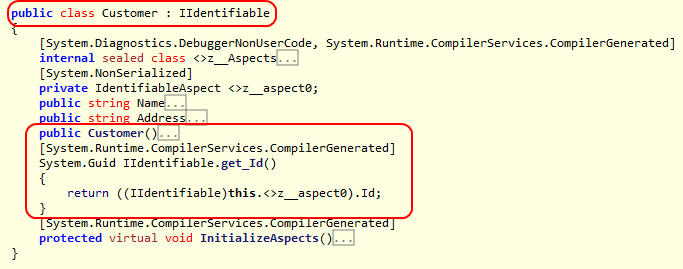
As you can see in the decompiled code, interfaces are implemented explicitly on the target code. It is also possible to introduce public members to target code. This is covered below.
Note
Interfaces and members introduced by PostSharp are not visible at compile time. To access the dynamically applied interface you must make use of a special PostSharp feature: the Cast<TSource, TTarget>(TSource) pseudo-operator. The Cast<TSource, TTarget>(TSource) method allows you to safely cast the target code to the interface type that was dynamically applied. After that call, you can use the instance through the interface constructs. There is no way to access a dynamically inserted method, property or event, other than through reflection or the dynamic keyword.
Note
When you start adding code constructs to your target code, you need to determine how to initialize them correctly. Because these code constructs are not available for you to work with at compile time, you need to figure out how to deal with them some other way. To learn more about initializing code constructs that you introduce via aspects, see Initializing Aspects.
Introducing methods
The introduction of methods to your target code is very similar to introducing interfaces. The biggest difference is that you will be introducing code at a much more granular level.
Create an aspect that inherits from InstanceLevelAspect and add the custom attribute [PSerializableAttribute].
Add to the aspect the method you want to introduce to the target code.
Note
The method that you declare must be marked as public. If it is not, you will see an error at compile time.
Decorate the method with the IntroduceMemberAttribute attribute. The complete aspect is the following:
[PSerializable]
public class OurCustomAspect : InstanceLevelAspect
{
    [IntroduceMember]
    public void TheMethodYouWantToUse( string aValue )
    {
        Console.WriteLine( "Inside a method that was introduced {0}", aValue );
    }
}
Finally, declare where you want this aspect to be applied in the codebase.
[OurCustomAspect]
public class Customer
{
    public string? Name { get; set; }
}
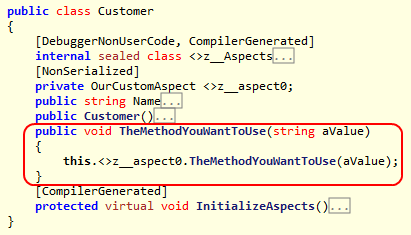
After compilation, you can decompile the target code and see that the method has been added.
Introducing properties
The introduction of properties is almost exactly the same as the introduction of methods. As when introducing a method, you use the IntroduceMemberAttribute attribute. The details follow.
Create an aspect that inherits from InstanceLevelAspect and add the custom attribute [PSerializableAttribute].
Add the property you want to introduce to the aspect.
Note
The property that you declare must be marked as public. If it is not, you will see a compiler error.
Decorate the property with the IntroduceMemberAttribute attribute. The complete aspect is the following:
[PSerializable]
public class OurCustomAspect : InstanceLevelAspect
{
    [IntroduceMember]
    public string? Name { get; set; }
}
Add the aspect attribute to the target code where the aspect should be applied.
[OurCustomAspect]
public class Customer
{
}
After you have compiled the codebase you can decompile the target code and see that the property has been added.

As noted for both the introduction of methods and properties, the code being introduced must be declared as public. This is needed to ensure that PostSharp can function. If you look closely at the decompiled targets you will see that the introduced members are actually calling the methods/properties that were declared on the aspect. If the method/property on the aspect is not public, the target code will not be able to call it as it should.
Note
It is possible to introduce properties to target code, but it is not possible to introduce fields to your target code. The reason is that all members are introduced by delegation: the actual implementation of the member always resides in the aspect.
Controlling the visibility of introduced members
You may not want the introduced member to have public visibility once it has been introduced to the target code. PostSharp allows you to control the visibility of the introduced member through the use of the Visibility property on the aspect. To declare that a member should be introduced with private visibility, set this property accordingly.
[IntroduceMember( Visibility = Visibility.Private )]
public string? Name { get; set; }
You can introduce members with a number of different visibilities, including public, private, assembly (internal in C#) and others. You can also declare an introduced member as virtual by setting the IsVirtual property to true.
[IntroduceMember( Visibility = Visibility.Private, IsVirtual = true )]
public string? Name { get; set; }
Overriding members or interfaces
One thing you need to be aware of is the situation where you are introducing a member that may already exist in the scope of the target code. Perhaps the method you are trying to introduce is available on the target code through inheritance. The method may also be declared explicitly on the target code. The introduction of a member via an aspect needs to take these situations into account. PostSharp allows you to take these situations into account through the use of the OverrideAction property.
The OverrideAction property allows you to declare a rule for how the introduction of a member should behave if the member already exists in the target type or its base type. This property allows you to declare rules such as Fail (any conflict causes a build-time error; this is the default), Ignore (continue on without trying to introduce the member), OverrideOrFail or OverrideOrIgnore. For interfaces, use the OverrideAction property of IntroduceInterfaceAttribute, which accepts Fail or Ignore. It is important to understand how you want to apply your introduced members and interfaces in situations where that member or interface may already exist.
[IntroduceMember( OverrideAction = MemberOverrideAction.Fail )]
public string? Name { get; set; }
Introducing interfaces dynamically
The final technique that you can use to introduce code constructs to your target code is the CompositionAspect. When you create a CompositionAspect, you choose at build time which interfaces to add to the target class, and you provide the object that implements them at run time.
Create an aspect that inherits from CompositionAspect and add the custom attribute [PSerializableAttribute]. The following steps add the members of the aspect.
Next, you need some way to tell the aspect what interface and concrete type you want to implement on the target code. To do that, create a constructor for your aspect that accepts two parameters: one for the interface type and one for the concrete implementation type. Assign those two constructor parameters to fields so that you can use them in the aspect. The fields cannot be
readonlybecause the aspect is serializable.private Type _interfaceType; private Type _implementationType; public GeneralCompose( Type interfaceType, Type implementationType ) { _interfaceType = interfaceType; _implementationType = implementationType; }There are two methods that you need to implement to complete this aspect. The first is an override of the GetPublicInterfaces(Type) method. This method has a target type parameter, which allows you to filter the application of the interface if you choose to. For this example, return an array that contains the interface type that was provided via the aspect constructor.
protected override Type[] GetPublicInterfaces( Type targetType )
{
    return new[] { _interfaceType };
}
Note
The interfaces that are returned from the GetPublicInterfaces(Type) method will be applied to the target code during compilation.
The second method that you need to override is CreateImplementationObject(AdviceArgs). For this example, return an instance of the concrete implementation type that was provided in the aspect constructor. To create the instance, use the CreateInstance(Type) method.
public override object CreateImplementationObject( AdviceArgs args )
{
    return Activator.CreateInstance( _implementationType )!;
}
Note
The CreateImplementationObject(AdviceArgs) method is invoked at run time.
Apply the aspect to the target code as an attribute. Provide the attribute with the interface and concrete types that you wish to implement.
[GeneralCompose( typeof(IList), typeof(ArrayList) )]After compilation, the target class implements the interface and delegates its implementation to an instance of the concrete type. To use the interface from the same project, call the Cast<TSource, TTarget>(TSource) method.
[GeneralCompose( typeof(IList), typeof(ArrayList) )]
public class Fruit
{
    public Fruit()
    {
        IList list = Post.Cast<Fruit, IList>( this );
        list.Add( "apple" );
        list.Add( "orange" );
        list.Add( "banana" );
    }
}
When a program creates a
Fruitand enumerates it through the IList interface, it prints the following output:apple orange banana
See Also
Reference
CreateImplementationObject(AdviceArgs)
CompositionAspect
Cast<TSource, TTarget>(TSource)
INotifyPropertyChanged
IDisposable
InstanceLevelAspect
PSerializableAttribute
IntroduceInterfaceAttribute
IntroduceMemberAttribute
Visibility
IsVirtual
OverrideAction
Fail
Ignore
OverrideOrFail
OverrideOrIgnore
GetPublicInterfaces(Type)
CreateImplementationObject(AdviceArgs)
CreateInstance(Type)
Other Resources